> ## Documentation Index
> Fetch the complete documentation index at: https://docs.grabmygig.com/llms.txt
> Use this file to discover all available pages before exploring further.
# Account Settings
> Manage your Roadie connection, language preferences, and subscription
The Account settings page lets you manage your Roadie account connection, change language preferences, and control your subscription.
***
## Roadie Account Connection
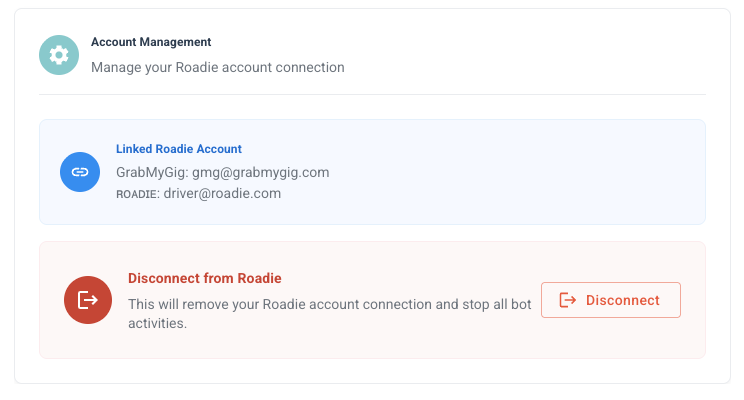 Your Roadie account must be connected for the bot to monitor and accept offers on your behalf.
### Connection Status
| Status | Description |
| ---------------- | ----------------------------------------------------- |
| **Connected** | Your Roadie account is linked and the bot can operate |
| **Disconnected** | No Roadie account linked - bot cannot accept offers |
| **Error** | Connection issue - reconnection required |
### Disconnecting Your Account
Disconnecting your Roadie account will **completely stop the bot** from monitoring and accepting offers.
To disconnect:
1. Go to **Settings** → **Account**
2. Click **Disconnect**
3. Confirm the disconnection
You can reconnect your Roadie account at any time. Your settings and preferences will be preserved.
### Reconnecting Your Account
If you've disconnected or need to update your credentials:
Go to **Settings** → **Account** and click **Connect** or **Reconnect**.
Enter your Roadie email and password.
Wait for the connection to be verified. You'll see a success message when complete.
If you changed your Roadie password, you'll need to reconnect with the new credentials.
***
## Language Settings
Your Roadie account must be connected for the bot to monitor and accept offers on your behalf.
### Connection Status
| Status | Description |
| ---------------- | ----------------------------------------------------- |
| **Connected** | Your Roadie account is linked and the bot can operate |
| **Disconnected** | No Roadie account linked - bot cannot accept offers |
| **Error** | Connection issue - reconnection required |
### Disconnecting Your Account
Disconnecting your Roadie account will **completely stop the bot** from monitoring and accepting offers.
To disconnect:
1. Go to **Settings** → **Account**
2. Click **Disconnect**
3. Confirm the disconnection
You can reconnect your Roadie account at any time. Your settings and preferences will be preserved.
### Reconnecting Your Account
If you've disconnected or need to update your credentials:
Go to **Settings** → **Account** and click **Connect** or **Reconnect**.
Enter your Roadie email and password.
Wait for the connection to be verified. You'll see a success message when complete.
If you changed your Roadie password, you'll need to reconnect with the new credentials.
***
## Language Settings
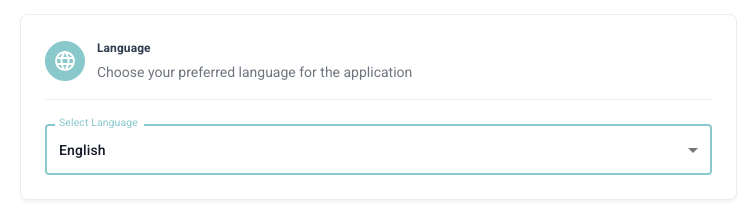 GrabMyGig supports multiple languages for the dashboard interface.
### Available Languages
| Language | Code |
| ----------- | ---- |
| **English** | EN |
| **Spanish** | ES |
### Changing Language
1. Go to **Settings** → **Account**
2. Find the **Language** dropdown
3. Select your preferred language
4. The interface will update immediately
Language settings affect the dashboard interface only. Notifications will be sent in your selected language.
***
## Subscription Management
Manage your GrabMyGig subscription from the Account settings.
### Current Plans
| Plan | Price | Best For |
| ----------- | ---------- | ------------------------------------------ |
| **Weekly** | \$2.49/day | Trying out the service, flexible schedules |
| **Monthly** | \$1.99/day | Regular drivers, best value |
### Managing Your Subscription
* **View Current Plan**: See your active subscription and renewal date
* **Upgrade/Downgrade**: Switch between Weekly and Monthly plans
* **Payment Method**: Update your credit card or payment details
* **Billing History**: View past invoices and payments
***
## Account Security
Yes! Your Roadie credentials are encrypted using industry-standard encryption. We never store your plain-text password, and our team cannot access your login details.
Disconnecting stops the bot completely. Your settings are saved, and you can reconnect anytime to resume.
Yes, you can access your GrabMyGig dashboard from any device. Your bot runs on our servers, not on your device.
***
## Need Help?
Get help from our support team.
Review the setup process.
GrabMyGig supports multiple languages for the dashboard interface.
### Available Languages
| Language | Code |
| ----------- | ---- |
| **English** | EN |
| **Spanish** | ES |
### Changing Language
1. Go to **Settings** → **Account**
2. Find the **Language** dropdown
3. Select your preferred language
4. The interface will update immediately
Language settings affect the dashboard interface only. Notifications will be sent in your selected language.
***
## Subscription Management
Manage your GrabMyGig subscription from the Account settings.
### Current Plans
| Plan | Price | Best For |
| ----------- | ---------- | ------------------------------------------ |
| **Weekly** | \$2.49/day | Trying out the service, flexible schedules |
| **Monthly** | \$1.99/day | Regular drivers, best value |
### Managing Your Subscription
* **View Current Plan**: See your active subscription and renewal date
* **Upgrade/Downgrade**: Switch between Weekly and Monthly plans
* **Payment Method**: Update your credit card or payment details
* **Billing History**: View past invoices and payments
***
## Account Security
Yes! Your Roadie credentials are encrypted using industry-standard encryption. We never store your plain-text password, and our team cannot access your login details.
Disconnecting stops the bot completely. Your settings are saved, and you can reconnect anytime to resume.
Yes, you can access your GrabMyGig dashboard from any device. Your bot runs on our servers, not on your device.
***
## Need Help?
Get help from our support team.
Review the setup process.