
Adding more cities expands your potential offers, but make sure they’re within a practical driving distance from your location.
Why Cities Matter
- Zone-Based Filtering: Roadie organizes offers by city/zone. You must have a city selected to receive offers from that area.
- Targeted Monitoring: Focus on areas where you know the roads, traffic patterns, and best routes.
- Flexibility: Add or remove cities anytime based on where you want to work.
Adding Cities
There are two ways to add cities to your list:Option 1: Add Manually
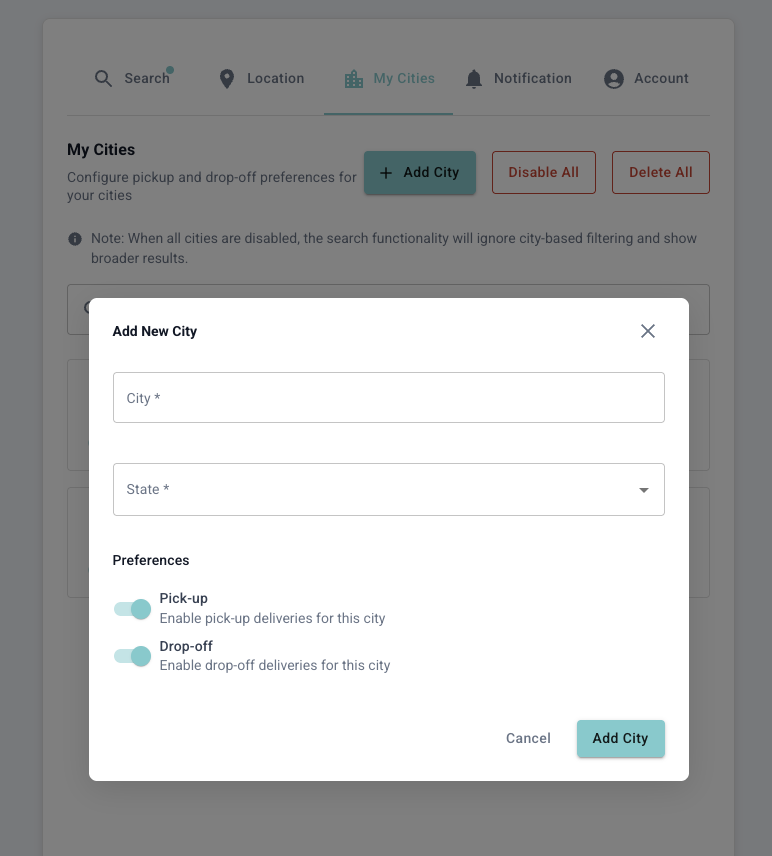
- Go to Settings → Cities
- Click Add City or the + button
- Search for the city/zone name
- Select the city from the dropdown
- Click Save to add it to your list
Option 2: Add from Offer
You can also add cities directly when you see an offer from a new area. This is a quick way to expand your coverage based on real opportunities.- When you see an offer from a city not in your list, you’ll see an option to add it
- Click Add City on the offer notification
- The city is automatically added to your Cities list
- Future offers from this city will be monitored
This method is great for discovering new profitable areas you might not have considered.
Managing Your Cities
Viewing Your Cities
All your selected cities appear in a list on the Cities settings page. You can see:- City/Zone name
- When it was added
- Option to remove
Removing a City
- Go to Settings → Cities
- Find the city you want to remove
- Click the Remove or X button
- Confirm the removal
Best Practices
Start Small, Then Expand
Start Small, Then Expand
Begin with 2-3 cities near your home. As you learn which areas have the best offers, gradually add more.
Consider Traffic Patterns
Consider Traffic Patterns
Some cities may be close in miles but far in drive time due to traffic. Factor this in when selecting cities.
Match with Distance Settings
Match with Distance Settings
Your Cities and Max Distance settings work together. Make sure they’re aligned - no point adding a city 30 miles away if your max distance is 15 miles.
Seasonal Adjustments
Seasonal Adjustments
Some areas are busier during certain seasons (beach towns in summer, ski areas in winter). Adjust your cities accordingly.
Common Questions
How many cities can I add?
How many cities can I add?
There’s no strict limit, but we recommend keeping it manageable (5-10 cities) for the best experience.
Do I need to add my home city?
Do I need to add my home city?
Yes! Make sure to add the city where your home location is set, otherwise you might miss nearby offers.
What if my city isn't listed?
What if my city isn't listed?
Roadie may not have coverage in all areas. If your city isn’t available, try searching for nearby larger cities or contact Roadie support.
Next Steps
Location Settings
Set your home location for distance calculations.
Notifications
Get notified when offers are accepted.